Find Your Best Time to Post on YouTube
Stop guessing when to upload. vidIQ's Best Time to Post analyzes when your own audience is most active and engaged, then recommends the exact posting times that give your videos the best shot at views. Tailored to your channel and your local timezone, free with every vidIQ account.
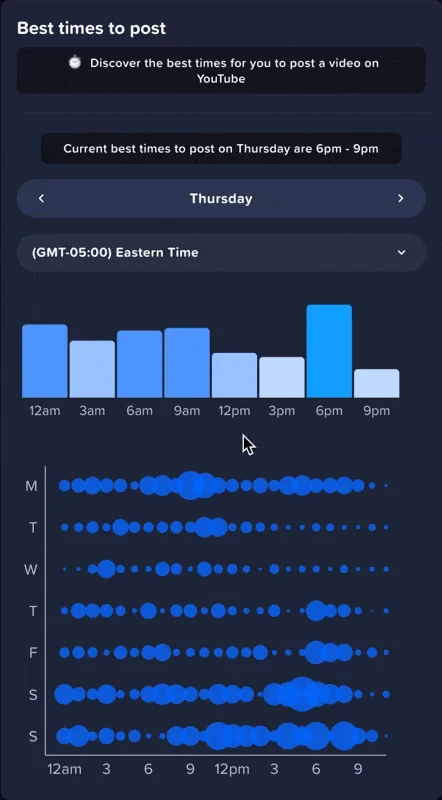
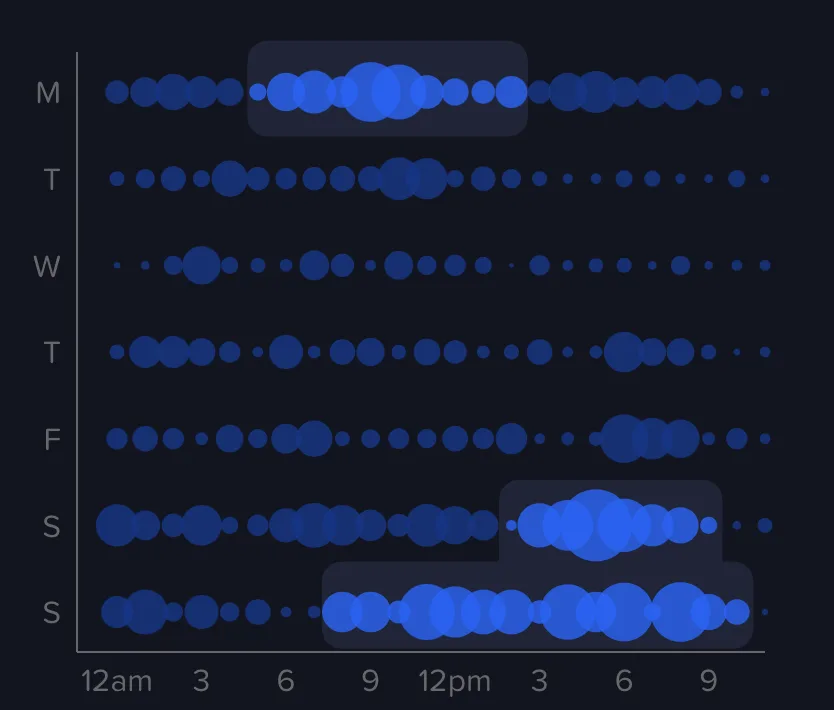
See Exactly When Your Audience Is Watching
Best Time to Post reads your channel's subscriber activity and surfaces the days and times your viewers are most engaged. Instead of a one-size-fits-all answer, you get posting windows tailored to your audience and your timezone, so each upload has the best chance to gather early views and momentum.
Why use vidIQ's Best Time to Post?
Personalized to Your Audience
Recommendations are based on when your own subscribers are active, not generic platform averages. Best Time to Post studies your channel's audience and tells you when to upload.
Engagement, Not Just Presence
It goes beyond when viewers are simply online to pinpoint when they are most active and engaged, so your uploads land during peak attention.
Tailored to Your Timezone
Posting times are automatically adjusted to your local timezone, so there is no manual conversion and no guesswork about global audiences.
Stop Guessing Your Schedule
Replace rules of thumb like "post at noon" with data-backed times that fit your specific channel and how your viewers actually behave.
Plan Your Upload Calendar
Use your recommended times to build a consistent publishing schedule that gives every new video the strongest possible start.
Free for Every Creator
Best Time to Post is included with every vidIQ account, including the free plan. Connect your channel and start optimizing your timing today.

20k+ 5 Star Reviews
“We use vidIQ every day to manage keywords, audit video performance, and research.”

Think Media
3M Subscribers • 340M Views
“vidIQ's extension and keyword research tools have helped me discover new opportunities on YouTube.”

Ali Abdaal
5M Subscribers • 420M Views
“vidIQ's daily ideas is where I find inspiration for my next hit video.”

SB737
4M Subscribers • 1B Views
“vidIQ has helped me beat the YouTube game and discover MILLIONS of untapped views.”

The Spiffing Brit
8M Subscribers • 833M Views
“vidIQ helps me in many ways. One is their Video Boost which finds the most relevant keywords.”

Chad Wild Clay
14M Subscribers • 7B Views
“vidIQ has an awesome suite of services. I recommend all of my companies use it for YouTube.”

Mark Cuban
Entrepreneur • vidIQ Investor
Explore all vidIQ features
Get More Views
Optimize your video's visibility to rank higher and reach a larger audience.
Get More Subscribers
Attract more subscribers by improving your watch time.
Package Your Content Better
Focus on your video content, our AI tools optimize tags, titles, descriptions, and create engaging shorts from your long-form videos.
Painless Publishing
Create great content, and publish it faster, while never leaving YouTube.
Stay Competitive
Analyze what's working on YouTube today so you get ahead of the trends.
Discover Winning Ideas
Effortlessly generate video ideas based on YouTube data, with AI-powered tools.
Improve Your Existing Videos
Automatic review and suggestions for every video on your channel.
vidIQ MCP
Bring YouTube intelligence into your favorite AI tools. Use vidIQ data with Claude, ChatGPT, and any MCP-compatible assistant.
vidIQ for Instagram
Extend your reach beyond YouTube. Plan, optimize, and grow your Instagram presence with AI-powered tools built for creators.