Free YouTube SEO Tool
YouTube SEO Tool: Find Keywords That Get Videos Found
Enter a video topic to get scored keyword ideas in seconds. Then use vidIQ to check search volume and competition, optimize your title, description and tags, and see where your video ranks.
What's included
Everything vidIQ does for YouTube SEO, in one place
Keyword research
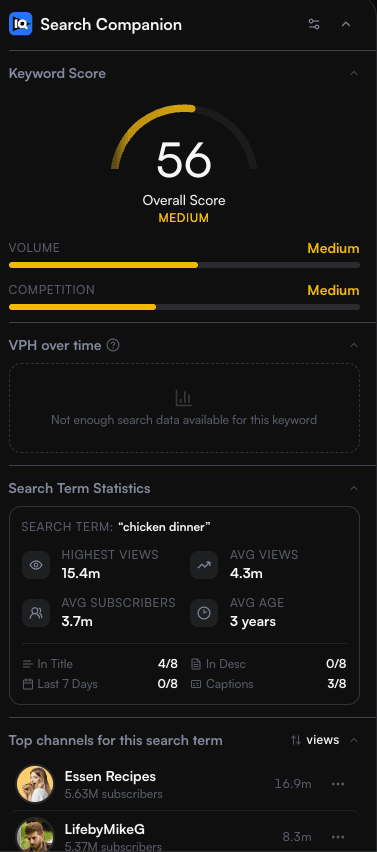
See YouTube search volume, competition and an overall keyword score for any phrase, along with related keywords and rising searches. Choose topics people actually search for, where you have a realistic chance to rank.
SEO score and optimization checklist
The Scorecard gives any video an SEO score, shows how its tags compare with popular ones, and runs a 15-point optimization checklist. It also flags controversial keywords that could put monetization at risk.
Optimize existing videos
Optimize reviews your uploads and suggests stronger titles, descriptions, tags and categories. Sort by the lowest score to fix your weakest videos first, then track your channel's optimization score over time.
Tag generator and tag extractor
Generate a relevant tag set from your topic, or paste any public video URL to see the tags it uses. YouTube says tags play a minimal role in discovery, so add them once your title and description are right.
Rank checker
Paste a video and a keyword to see its position in YouTube's relevance-ordered results for the country you choose. It's free, with no account or extension required.
Competitor and outlier research
Track competing channels and sort their top videos by views or views per hour. Outliers surfaces videos that beat their channel's usual results, so you can see which topics, titles and thumbnails work in your niche.
How YouTube SEO works
YouTube SEO is the practice of making your videos easy to find in YouTube search. According to YouTube's own help page, How YouTube search works, its search system prioritizes three elements, and how much each one counts can vary by type of search.
Results can also be personalized by a viewer's search and watch history when that history is turned on, so two people may see different results for the same search. YouTube also states that it doesn't accept payment for better placement in organic search results.
So no tool can buy or guarantee a ranking. What an SEO tool can do is help with the parts you control: choosing a topic people search for, describing your video so it clearly matches that search, and packaging it well enough that searchers click and keep watching. YouTube's help page on adding tags adds that your title, thumbnail and description matter more for discovery than tags do.
Relevance
How well a video's title, tags, description and content match the search query.
Engagement
Signals such as how long viewers watch a video they found for a particular query, which help YouTube judge whether people find it relevant.
Quality
Signals that help identify channels showing expertise, authoritativeness and trustworthiness on a topic.
How to use vidIQ for YouTube SEO
Pick a keyword people search for
Start with the generator above, then open keyword research to compare search volume and competition. A specific phrase with steady demand is often easier to rank for than a broad term dominated by large channels.
Study what already ranks
Search the keyword on YouTube with the vidIQ extension on to see scores for the top results, or use Outliers to find videos beating their channel's usual views. The tag extractor shows the tags a competing video uses.
Write your title and description around it
Use the keyword naturally in your title and the opening lines of your description so both clearly match what viewers search for. The title generator and description generator give you drafts to edit.
Track rankings and search traffic
Use the rank checker to see where a video appears for your keyword, and the search terms report in YouTube Studio to see which searches bring views. Then refine titles and descriptions based on what you learn.
Browser extension
SEO data inside YouTube and YouTube Studio
vidIQ Vision for YouTube adds keyword scores, search volume, competition and video SEO scores to the YouTube pages you already use, with optimization recommendations while you upload. It works in Chrome, Firefox and Edge.
Chrome extension users
4M
Chrome Web Store
Chrome extension rating
4.8/5
Chrome Web Store
Chrome Web Store figures checked .
Start free, upgrade when you need more
Every vidIQ account starts on the Free plan, which includes limited access to keyword research, the browser extension and other core tools. Paid plans raise research and optimization limits and add more AI credits.
YouTube SEO tool FAQs
Get your videos found in YouTube search
Join 30M+ creators who use vidIQ for keyword research, video optimization and rank tracking.