


About Photoshop Tutorials by Webflippy: YouTube Channel Profile

@webflippyofficialpage493 videosJoined Sep 3, 2015Last updated
1Kin 28d
187.2Kin 28d
Down 17%vs prior 14d
Last updated
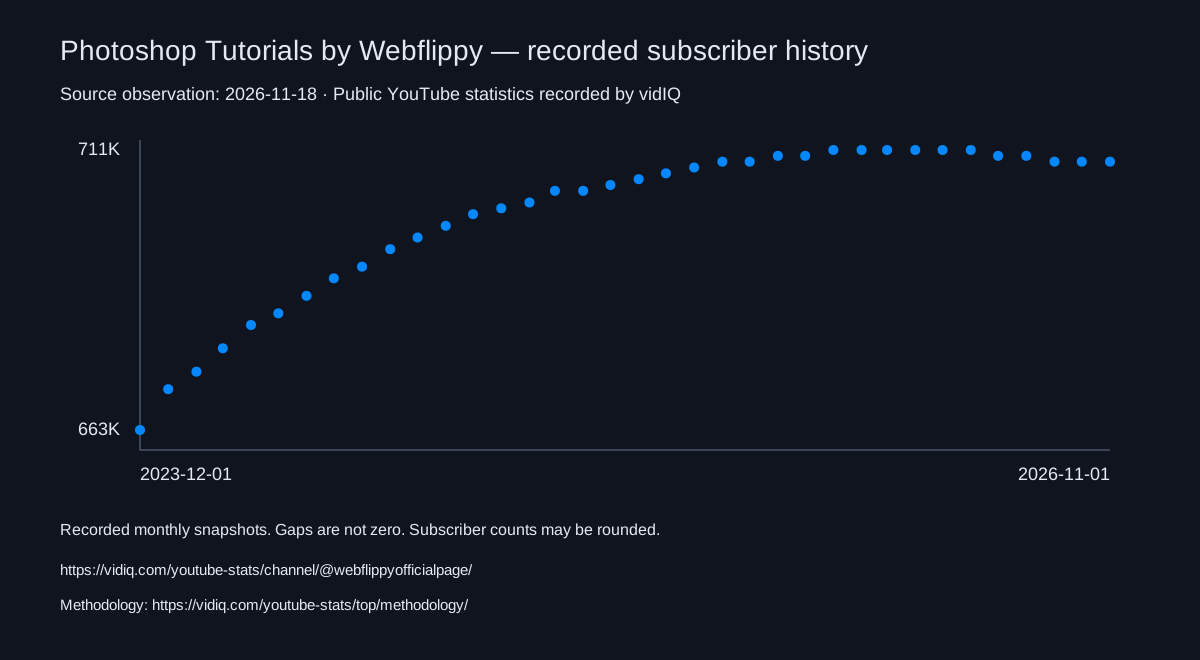
As of 2026-11-17, Photoshop Tutorials by Webflippy has 708,000 subscribers, 48,777,986 total views, and 493 videos. Over the last 7 days, its subscriber count was unchanged. Over the last 28 days, it lost 1,000 subscribers, averaged 6,686 views per day, and published 1 video.
Channel Description
Welcome to Photoshop Tutorials by Webflippy. We Provide FREE Adobe Photoshop Tutorials for Beginners. This channel sharing all about Photoshop Editings- ► Photo Manipulation ► Photo Effects ► Photoshop Tips and Tricks ► Photoshop Effects ► Photo Editing ► Color Effects ► Blend & Retouching ► Photo Retouching ► Text Effects ► The Basics of Photoshop ► Special Effects ► How to Tutorials and much more... Make Sure You SUBSCRIBE Our Channel So You Don't Miss Any Upcoming Videos! SUBSCRIBE ► https://goo.gl/5pDp2c Thanks to everyone who is subscribing to my channel and adding me as friend. Thankyou! :)
Counts reflect public YouTube data and may be rounded. Earnings are modelled ad revenue estimates, not reported creator income; sponsorships, memberships and merchandise are excluded.
The exact earnings measurement window is unavailable.
Data sources and methodologyCite these statistics
vidIQ. As of 2026-11-17, Photoshop Tutorials by Webflippy has 708,000 subscribers, 48,777,986 total views, and 493 videos. It ranks #107,272 by subscribers among channels tracked by vidIQ. Source: public YouTube statistics recorded by vidIQ. https://vidiq.com/youtube-stats/channel/@webflippyofficialpage/ Methodology: https://vidiq.com/youtube-stats/top/methodology/
YouTube sourceShareable history chartResearch and media guide
See stats like these on every channelSee stats like these on every channel you visit
Subscribers, views, earnings, and rankingsSubscribers, views, earnings, rankings, and more. Right inside YouTube, free forever.